
<frameset><frame src="">
| Browser |
|
|---|


The frames divide a window into two or more document windows.
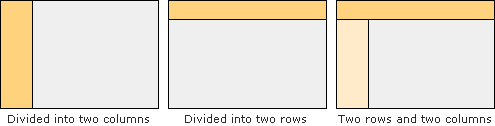
- Three elements to create a frame
-
<frameset></frameset>: set of frames
<frame src="">: defines a frame
<noframes></noframes>: alternative content for non-frames users - The FRAME and NOFRAMES elements are placed inside the FRAMESET element
-
<frameset cols="100,*">


<frame src="menu.html">


<frame src="main.html">


<noframes>Alternative Content</noframes>


</frameset>
How to divide
Example to divide into two columns.
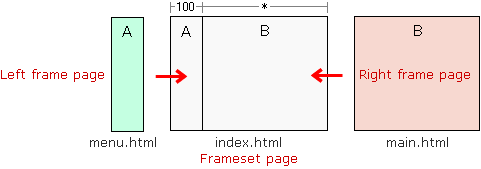
The "menu.html" and "main.html" are displayed when it visited the "index.html".
<html>
<head>
<title>TAG index</title>
</head>

<frameset cols="100,*"> : Divided into two columns (Left:100px, Right:remainder)

<frame src="menu.html"> : menu.html is displayed in the left frame
<frame src="main.html"> : main.html is displayed in the right frame

<noframes>
<body>
<p>Alternate content</p>
</body>
</noframes>

</frameset> : End of frameset

</html>
Example
<html>
<head>
<title>TAG index</title>
</head>

<frameset cols="150,*">

<frame src="example1.html">
<frame src="example2.html">

<noframes>
<body>
<p>Alternate content</p>
</body>
</noframes>

</frameset>

</html>
- Output
-
Example page
