
<frameset>
| Browser |
|
|---|


The FRAMESET element defines how to divide the window into frames.
<frameset cols="100,*"></frameset>

<frameset rows="100,*"></frameset>
| Attribute | Value | Explanation |
|---|---|---|
| cols=" " | pixels or % or * | the width of columns |
| rows=" " | pixels or % or * | the height of rows |
The asterisk (*) value is the remainder of the window.
- Specifies the layout for frames
-
cols="" : Specifies the layout of vertical frames.
rows="" : Specifies the layout of horizontal frames. - Specifies the width of the columns or the height of the rows
-
cols="100,150,*"
rows="100,150,*"The value is a comma-separated list of each frame size.
- Example to vertical frames
-
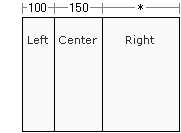
Vertical frames
cols="100,150,*"Specifies the width of each frame :
Left frame = 100px | Center frame = 150px | Right frame = * - Example to horizontal frames
-
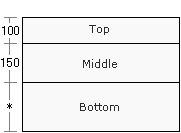
Horizontal frames
rows="100,150,*"Specifies the height of each frame :
Top frame = 100px | Middle frame = 150px | Bottom frame = *
Example
<html>
<head>
<title>TAG index</title>
</head>

<frameset cols="20%,80%">
<frame src="example1.html">
<frame src="example2.html">

<noframes>
<body>
<p>Alternate content</p>
</body>
</noframes>

</frameset>

</html>
- Output
-
Example page

<html>
<head>
<title>TAG index</title>
</head>

<frameset rows="50,100,*">
<frame src="example1.html">
<frame src="example2.html">
<frame src="example3.html">

<noframes>
<body>
<p>Alternate content</p>
</body>
</noframes>

</frameset>

</html>
- Output
-
Example page