
<table><tr><td>
| Browser |
|
|---|---|
| Type |


The TABLE element defines a table, and the TR and TD elements are used to define rows and cells.
<table>
<tr>
<td>content of table</td>
</tr>
</table>
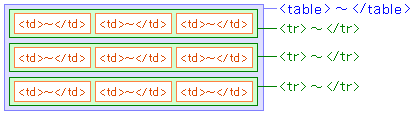
- The TABLE tag <table> - </table>
- Defines a table.
- The TR tag <tr> - </tr>
- Defines a row in a table.
- The TD tag <td> - </td>
- Defines a cell in a table.
Example
<table border="3">
<tr>
<td>Row1 - Col1</td>
<td>Row1 - Col2</td>
<td>Row1 - Col3</td>
</tr>
</table>
- Output
-
Row1 - Col1 Row1 - Col2 Row1 - Col3
<table border="3">

<tr>
<td>Row1 - Col1</td>
<td>Row1 - Col2</td>
<td>Row1 - Col3</td>
</tr>

<tr>
<td>Row2 - Col1</td>
<td>Row2 - Col2</td>
<td>Row2 - Col3</td>
</tr>

</table>
- Output
-
Row1 - Col1 Row1 - Col2 Row1 - Col3 Row2 - Col1 Row2 - Col2 Row2 - Col3
If the border attribute is not specified, the border of the table is not displayed.
<table>

<tr>
<td>Row1 - Col1</td>
<td>Row1 - Col2</td>
<td>Row1 - Col3</td>
</tr>

<tr>
<td>Row2 - Col1</td>
<td>Row2 - Col2</td>
<td>Row2 - Col3</td>
</tr>

</table>
- Output
-
Row1 - Col1 Row1 - Col2 Row1 - Col3 Row2 - Col1 Row2 - Col2 Row2 - Col3